Contact →

Services

Engineered infrastructure services for mission-critical environments. Zero-trust orchestration and deterministic performance across every deployment.

Solutions

Deployable solutions for mobile, off-grid, and high-urgency environments. Designed for practical operations and delivered by experienced engineers.

Company

Veteran-owned and mission-driven. ETHRX builds technology that restores confidence in critical infrastructure.

Support

Product documentation and a direct line to the engineers who built it — no ticket queue between you and an answer.

Blog
Contact Us →

CHAOS · Network test & evaluation appliance

CHAOS

Break the network before the field does.

CHAOS sits in-line on a real link. Impair it, watch it untouched, or drive traffic, voice and video across it, and keep a sealed, hardware-timestamped record of every run.

CHAOS / Dashboard
To B5,848 pkt/s

53.8Mbps

To A2,327 pkt/s

3.3Mbps

Droppedseconds with drops, last minute

0packets/s

Added latencyhighest of the two

0ms

to Bnoneto Anone
Trafficto Bto A
50 Mbps100 Mbps
-120s-90s-60s-30snow
Impairments

Out of port 3 · to A

delay
off
jitter
off
loss
off
rate
∞
clean — nothing applied

Out of port 4 · to B

delay
off
jitter
off
loss
off
rate
∞
clean — nothing applied
ActivityNothing yet. Changes to conditions and runs show up here.

The CHAOS dashboard, working. Take the faders.Interactive replica · figures simulated in your browser

  • In-line at Layer 2No addresses or routes to change on the devices under test.
  • Per directionEach way of the link gets its own conditions.
  • Hardware-timestampedCaptures stamped by the data ports’ own clocks.
  • Sealed runsA SHA-256 manifest over every file a run leaves.
  • On-premisesNo cloud. Signed updates install offline, too.

Three modes

One appliance, three jobs on the link.

Impair the traffic between your devices, inspect it untouched, or generate your own from endpoints on the box. Switch between them from the top of the dashboard.

DEVICE ADEVICE BCHAOSDELAY · LOSS · RATE, EACH WAY

Impair

Bend a real link.

Put CHAOS between two of your devices and give the link the conditions it will meet in the field, set separately for each direction. Dial them live, or run a scenario that changes them over time.

  • Delay, jitter, loss, duplication, reordering, corruption, rate and queue
  • Scenarios with steps and ramps on a timeline
  • Rate, drops and added delay, live, both ways
DEVICE ADEVICE BCHAOSPCAPNGPASSED THROUGH, RECORDED

Inspect

Watch a link, untouched.

Leave the link exactly as it is. Traffic passes straight through while CHAOS measures each direction and records both sides, so you know what normal looks like before you change anything.

  • Nothing added to the path
  • Both ports captured to pcapng, ready for Wireshark
  • A baseline to hold every impaired run against
CHAOSabEMULATIONYOUR NETWORK

Generate

Be both ends of the test.

No test devices to hand? CHAOS hosts the endpoints itself. Decide who sends what to whom, from raw load to a voice call or a video stream, and see exactly what arrived.

  • UDP and TCP load, voice and video
  • Through the emulation, or out over your real network
  • An SLA turns any run into a pass or a fail

Impair

Each direction, its own network.

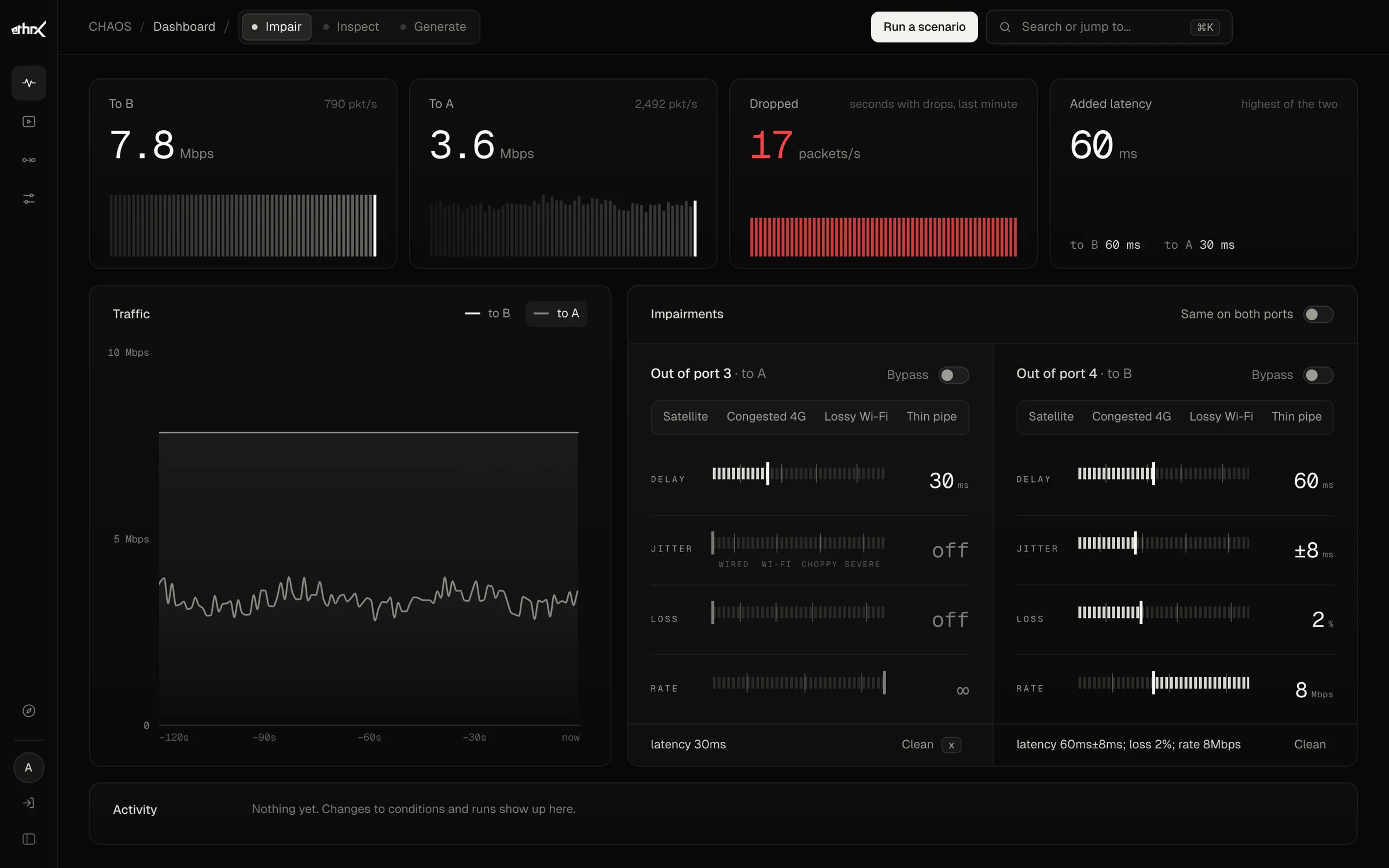
Real links aren’t symmetric, so CHAOS doesn’t make you pretend. Set the way out and the way back on their own: start from a preset, fine-tune with the faders, and watch the drops and added delay as they happen.

  • Satellite
  • Congested 4G
  • Lossy Wi-Fi
  • Thin pipe

When the conditions should change mid-test, write a scenario: steps and ramps on a timeline, checked before it runs, replayed exactly the same way next time.

The CHAOS Impair dashboard: toward B, 60 ms with 8 ms of jitter, 2% loss and an 8 Mbps cap; toward A, 30 ms. Live rates, dropped packets in red and the added latency sit above the faders.
Toward B: 60 ms ±8 ms, 2% loss, capped at 8 Mbps. Toward A: 30 ms. Dropped packets show in red as they happen.

Generate

Who sends what, to whom. Loss first.

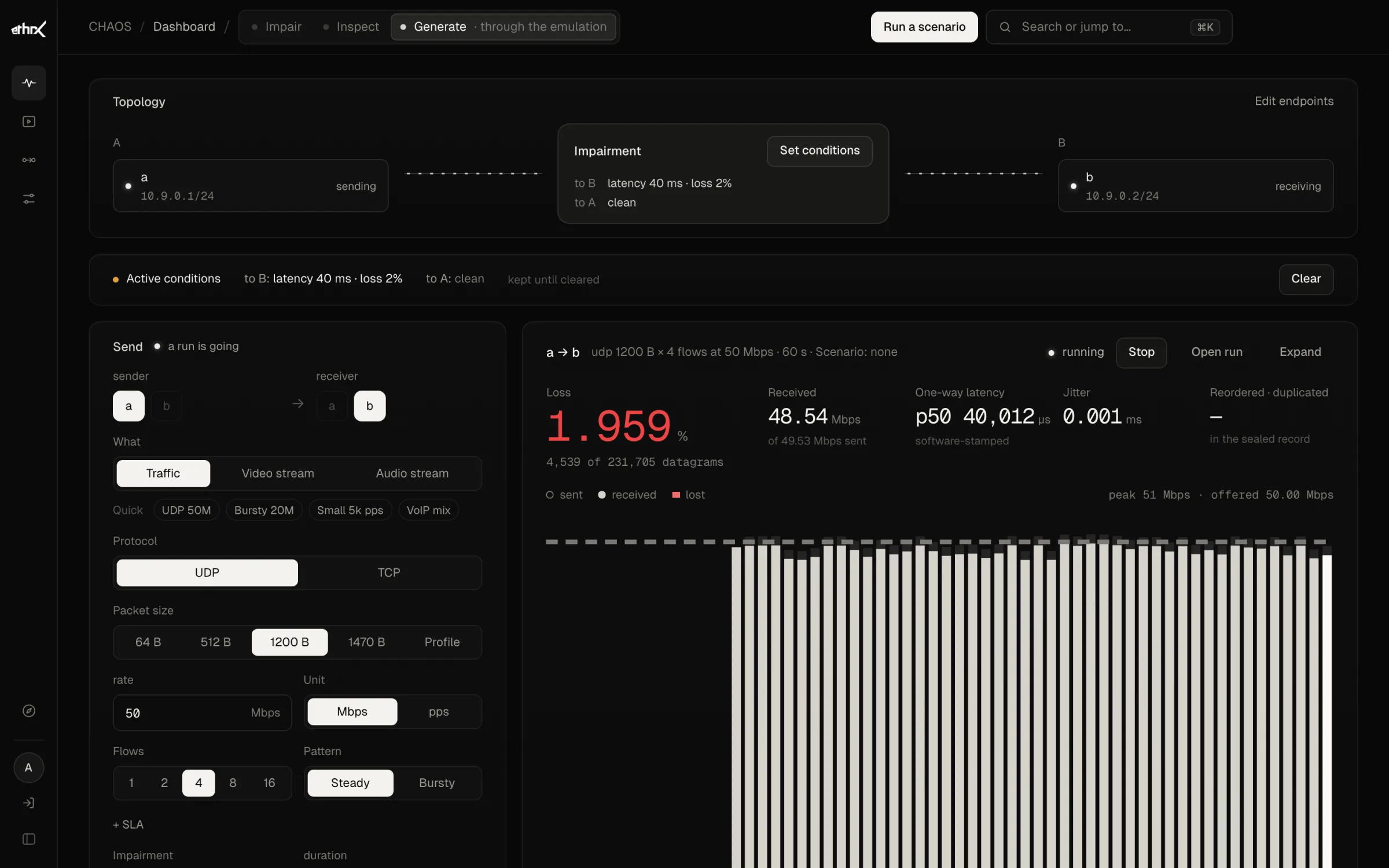
Name a sender and a receiver on the box, choose what to send and how hard, and start. Every result opens with what was lost, then what arrived, how late and how unevenly.

Traffic UDP · TCP

Packets from 64 to 1470 bytes or a traffic profile, a rate in Mbps or packets per second, 1 to 16 flows, steady or bursty. Received, lost, one-way latency and jitter, second by second.

Voice RTP · PCM · G.711

A WAV clip streamed as RTP, played out through a jitter buffer and recorded as it arrives. Listen to what was sent and what was heard, side by side, with their levels drawn.

Video MPEG-TS

A transport stream sent at its own clock and recorded on arrival. Watch the sent and received pictures side by side, live as the run goes or played back afterwards.

Path 1Through the emulation

A closed loop on the box, under the conditions you set or a scenario.

Path 2Out over the real network

Out of one port, across your network as it is, and back in the other.

The CHAOS Generate dashboard: endpoint a sends 50 Mbps of UDP to endpoint b through 40 ms of delay and 2% loss; the result leads with 1.959% loss, 4,539 of 231,705 datagrams, above a per-second chart of sent and received.
Topology on top, the composer on the left, the result on the right, loss first: 1.959% lost.Screen from the CHAOS web UI, built-in demo
Try itIllustrative · runs in your browser

Know before you field it.

Nobody buys CHAOS for the chaos. They buy knowing how their system behaves when the network turns hostile. Patch it in between two sites, give the link the network your system will meet, and leave with a sealed answer. This is that bench, in your browser.

  1. 1Patch in
  2. 2Bring it up
  3. 3Give it the field
  4. 4Get the verdict

Put CHAOS in the path.

Site A is a drone ground station; Site B is the ops centre that depends on its feed. Drag Site A's cable into Port 3, then the other into the other port. CHAOS is a transparent bridge, so nothing on either side gets reconfigured.

Site AUAV ground stationSending
WAN
CHAOSIn-line · transparent L2 bridgeIdle
12VUSB-CUSB123456
Site BOps centreWaiting
WAN
CHAOS / DashboardImpairPort 3Port 4
To Bno link

—

To Ano link

—

Droppedlast 40 s

—

Latencyadded, each way

—

ImpairmentsSame on both ports
delay
1ms
jitter
off
loss
off
rate
∞
clean — nothing applied
Ports 3 and 4 are apart. Patch both sites in to bring the link up.
Activity

Nothing yet. Links, changes to conditions and runs show up here.

No signal
Drone video
—
50 MB mission file
—
Voice comms · MOS
—

Nothing is reaching Site B yet. Patch both sites into CHAOS to bring the link up.

Illustrative, computed in your browser; no network traffic. The same impairment is applied to both ports. File time: Mathis TCP model. Voice: simplified ITU-T G.107 E-model, G.711. Video freezes: an illustrative estimate. Pass thresholds are examples; on a real bench you set your own.

Evidence

Every run leaves a record that holds up.

When a run ends, CHAOS seals it: the scenario as it ran, every event, both ports’ captures and the state of the box, listed in a manifest that carries a SHA-256 for each file. Read the report in the browser, or take the whole bundle with you.

run-20261103-0001/sealed
  • scenario.tomlThe scenario, exactly as it ran
  • events.jsonlEvery change, in order, with both clocks
  • port1.pcapngWhat crossed port 1, hardware-stamped
  • port2.pcapngWhat crossed port 2, hardware-stamped
  • traffic.jsonGenerated traffic, second by second
  • system-state.jsonKernel, build, topology and calibration
  • report.mdThe report; HTML on request
  • manifest.jsonA SHA-256 for every file above, and when it was sealedsha256 9f4c2e71b0d83a5e…

Specifications

Built for the lab, and for the audit.

One appliance, measured and calibrated on the hardware it ships on, with the security posture federal programs ask about built in from the start.

Hardware

Platform
ETHRX-ONE-N305-RACK
Processor
Intel Core i3-N305
Data ports
2 × 2.5 GbE, Intel i226-V, each with a hardware clock
Reserved
2 × 10 GbE, Aquantia AQC113C
Data plane
1 Gbps, both directions
Root of trust
TPM 2.0

Software

Operating system
Debian 13, real-time (PREEMPT_RT) kernel
Boot
UEFI with Secure Boot on
Control
Web UI, HTTP/JSON API with OpenAPI, CLI
Sign-in
Local accounts or OIDC; admin, operator and viewer roles
Monitoring
Prometheus metrics behind an API token
Calibration
Run from the UI; every report cites it

Posture

Updates
Signed bundles, fetched or uploaded offline, rolled back on failure
SBOM
CycloneDX, shipped with every release
Remote access
SSH off by default; key-only when enabled
Sessions
Every API call authenticated, on every interface
Licensing
Bound to the unit’s TPM
Data
Stays on the appliance

Built for

Teams whose systems can’t fail in the field.

  • 01Test & evaluationDevelopmental and operational test for DoD programs and the contractors who build for them.
  • 02Equipment makersQA labs proving a radio, router or application across realistic links, run after run, from the API.
  • 03Network operatorsPublic-safety and critical-infrastructure teams validating a change before it meets the field.
  • 04Service providersEngineering and assurance teams checking a customer service ahead of rollout.

Evaluate CHAOS

Put it on your link.

CHAOS runs on ETHRX-ONE, a TPM-anchored, hardware-timestamped appliance built for test and evaluation. Evaluation units are available; tell us what you need to prove.

CHAOS · runs on ETHRX-ONEDebian 13 · PREEMPT_RTSBA VOSB · CAGE 11EE2